
Record attempts and FKTs (Fastest Known Times) on a fixed route can have two extras: a ghost dot that travels at record pace, and a record dashboard along the bottom of the map that shows how the attempt is going. Both are optional, so a map may have one, both or neither.
The ghost dot
The ghost dot is a dark dot with a label such as Current FKT. It moves along the route at the steady average speed needed to match the record. It doesn’t stop for sleep or breaks, so it keeps inching forward while the participant rests. If the participant stays ahead of the ghost dot, they’re on course to beat the record.
A map can have more than one ghost dot, for example one for the men’s record and one for the women’s. Each has its own label.
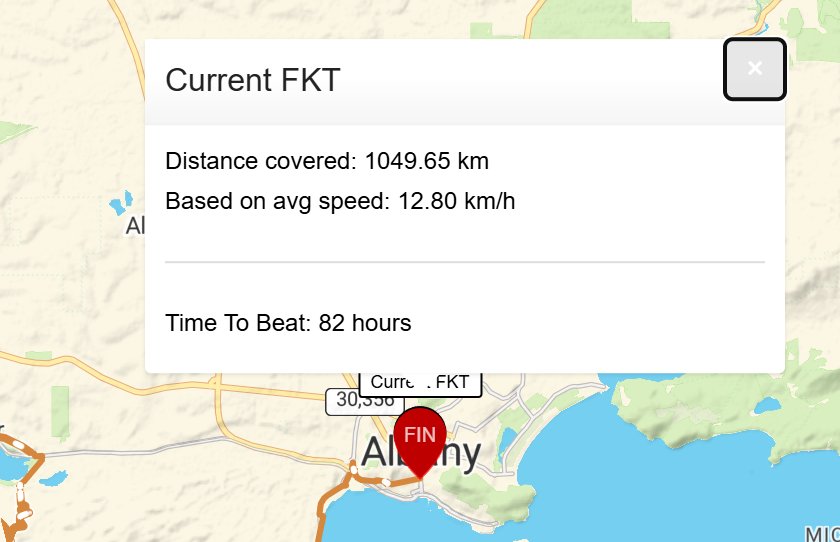
Click or tap the ghost dot to open its pop-up:
- Distance covered: the full distance of the record.
- Based on avg speed: the average speed needed to match the record.
- Time To Beat: the record time.
Once the record time has passed, the ghost dot waits at the finish.
For more about dots, see Participant Dots.
The record dashboard
The dashboard runs along the bottom of the Live map. When there’s more than one ghost dot, the dashboard compares the attempt with just one of the records. A coloured bar across the top fills from 0% to 100% as the participant covers the route. Below it are the figures:
- PAST 24 HRS: distance covered in the last 24 hours.
- DISTANCE TOTAL: distance covered so far.
- DISTANCE REMAINING: distance left to the finish.
- DISTANCE COVERED: how much of the route is done, as a percentage.
- TIME LEFT: time left before the record time runs out, in days, hours, minutes and seconds. Before the start it shows the full record time. Once the record time has passed it shows a dash (—).
- STATUS: AHEAD in green or BEHIND in red, compared with record pace. It shows READY TO START before the start and FINISHED at the end.

Est. before a distance means it’s an estimate, for example while the participant is off the route.
Distances follow your units setting, in km or miles. See Action Controls.
On a phone or small screen, the figures sit two to a row.
More detail on the attempt
The participant’s own pop-up and the Leaderboard still show their full figures, such as moving time and ETA. See Participant Pop-up & Track.
When you might not see it
- The ghost dot and dashboard only appear on fixed-route record attempts that include them.
- Some maps show only some of the dashboard figures.
- Other maps may show their own version of the dashboard, with figures that suit that challenge.
Related articles
Last reviewed: October 2026